스마트에디터 반응형
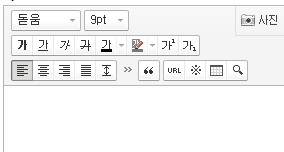
/plugin/editor/smarteditor2/css/ko_KR/smart_editor2.css
아래 소스 추가
#smart_editor2{margin-right:1px !important;min-width:100px !important}
@media screen and (max-width: 640px){
#smart_editor2 .se2_text_tool ul:nth-child(4n){clear:both;}
#smart_editor2 .se2_text_tool ul{margin-bottom:4px}
#smart_editor2 .se2_text_tool ul:nth-child(n+4){margin-bottom:0}
#smart_editor2 .se2_text_tool .se2_multy,#smart_editor2 .se2_text_tool .se2_multy button, #smart_editor2 .se2_text_tool .se2_multy button span{height:54px}
}
@media screen and (max-width: 515px){
#smart_editor2 .se2_text_tool ul:nth-child(3n){clear:both;margin-left:4px}
#smart_editor2 .se2_text_tool ul:nth-child(6n),#smart_editor2 .se2_text_tool ul:nth-child(4n){clear:none;margin-left:0}
#smart_editor2 .se2_text_tool ul:nth-child(n+3){margin-bottom:0}
}
@media screen and (max-width: 370px){
#smart_editor2 .se2_text_tool ul:nth-child(2n){clear:both;margin-left:4px}
#smart_editor2 .se2_text_tool ul:nth-child(3n){clear:both;margin-left:4px}
#smart_editor2 .se2_text_tool ul:nth-child(6n),#smart_editor2 .se2_text_tool ul:nth-child(4n){clear:none;margin-left:0}
#smart_editor2 .se2_text_tool ul:nth-child(n+3){margin-bottom:0}
#smart_editor2 .se2_text_tool .se2_multy,#smart_editor2 .se2_text_tool .se2_multy button, #smart_editor2 .se2_text_tool .se2_multy button span{height:79px}
}
@media screen and (max-width: 325px){
#smart_editor2 .se2_text_tool .se2_multy,#smart_editor2 .se2_text_tool .se2_multy button, #smart_editor2 .se2_text_tool .se2_multy button span{height:29px;}
#smart_editor2 .se2_text_tool .se2_multy{border-bottom:1px solid #e0dedf}
}
첨부파일
댓글 35개







감사합니다.^^


이소스를 어디에 붙여야할까요 맨아래인가요?
게시판 목록
그누보드5 플러그인
| 번호 | 제목 | 글쓴이 | 날짜 | 조회 |
|---|---|---|---|---|
| 633 | 4개월 전 | 802 | ||
| 632 | 4개월 전 | 521 | ||
| 631 | 4개월 전 | 748 | ||
| 630 | 4개월 전 | 759 | ||
| 629 | 5개월 전 | 600 | ||
| 628 | 5개월 전 | 641 | ||
| 627 | 5개월 전 | 666 | ||
| 626 | 5개월 전 | 625 | ||
| 625 | 5개월 전 | 1570 | ||
| 624 | 5개월 전 | 730 | ||
| 623 | 5개월 전 | 472 | ||
| 622 |
 thisgun thisgun |
6개월 전 | 634 |


댓글 작성
댓글을 작성하시려면 로그인이 필요합니다.
로그인하기