드롭 다운 헤더
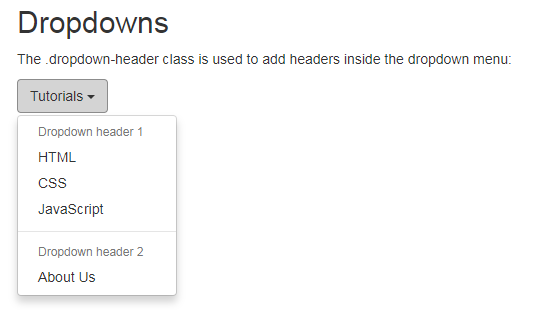
드롭 다운 헤더
이 .dropdown-header클래스는 드롭 다운 메뉴에 헤더를 추가하는 데 사용됩니다.
예제
<!DOCTYPE html>
<html>
<head>
<meta name="viewport" content="width=device-width, initial-scale=1">
<link rel="stylesheet" href="https://maxcdn.bootstrapcdn.com/bootstrap/3.3.7/css/bootstrap.min.css">
<script src="https://ajax.googleapis.com/ajax/libs/jquery/3.2.1/jquery.min.js"></script>
<script src="https://maxcdn.bootstrapcdn.com/bootstrap/3.3.7/js/bootstrap.min.js"></script>
</head>
<body>
<div class="container">
<h2>Dropdowns</h2>
<p>The .dropdown-header class is used to add headers inside the dropdown menu:</p>
<div class="dropdown">
<button class="btn btn-default dropdown-toggle" type="button" data-toggle="dropdown">Tutorials
<span class="caret"></span></button>
<ul class="dropdown-menu">
<li class="dropdown-header">Dropdown header 1</li>
<li><a href="#">HTML</a></li>
<li><a href="#">CSS</a></li>
<li><a href="#">JavaScript</a></li>
<li class="divider"></li>
<li class="dropdown-header">Dropdown header 2</li>
<li><a href="#">About Us</a></li>
</ul>
</div>
</div>
</body>
</html>
이 .dropdown-header클래스는 드롭 다운 메뉴에 헤더를 추가하는 데 사용됩니다.
예제
<!DOCTYPE html>
<html>
<head>
<meta name="viewport" content="width=device-width, initial-scale=1">
<link rel="stylesheet" href="https://maxcdn.bootstrapcdn.com/bootstrap/3.3.7/css/bootstrap.min.css">
<script src="https://ajax.googleapis.com/ajax/libs/jquery/3.2.1/jquery.min.js"></script>
<script src="https://maxcdn.bootstrapcdn.com/bootstrap/3.3.7/js/bootstrap.min.js"></script>
</head>
<body>
<div class="container">
<h2>Dropdowns</h2>
<p>The .dropdown-header class is used to add headers inside the dropdown menu:</p>
<div class="dropdown">
<button class="btn btn-default dropdown-toggle" type="button" data-toggle="dropdown">Tutorials
<span class="caret"></span></button>
<ul class="dropdown-menu">
<li class="dropdown-header">Dropdown header 1</li>
<li><a href="#">HTML</a></li>
<li><a href="#">CSS</a></li>
<li><a href="#">JavaScript</a></li>
<li class="divider"></li>
<li class="dropdown-header">Dropdown header 2</li>
<li><a href="#">About Us</a></li>
</ul>
</div>
</div>
</body>
</html>
첨부파일
댓글 7개

Bottom
7년 전
잘 보고 갑니다. 감사합니다.
7년 전
감사합니다..
7년 전
배우고 가요... 감사
darlylovelydarly
6년 전
감사합니다
choice2
6년 전
감사!!

6년 전
감사히 질 봤습니다.^^
6년 전
감사합니다~
게시판 목록
퍼블리싱강좌
| 번호 | 분류 | 제목 | 글쓴이 | 날짜 | 조회 |
|---|---|---|---|---|---|
| 118 | jQuery Mobile | 8년 전 | 1347 | ||
| 117 | jQuery Mobile | 8년 전 | 1597 | ||
| 116 | jQuery Mobile | 8년 전 | 1826 | ||
| 115 | jQuery Mobile | 8년 전 | 1782 | ||
| 114 | jQuery Mobile | 8년 전 | 1970 | ||
| 113 | jQuery Mobile | 8년 전 | 1882 | ||
| 112 | jQuery Mobile | 8년 전 | 2487 | ||
| 111 | jQuery Mobile | 8년 전 | 1795 | ||
| 110 | jQuery Mobile | 8년 전 | 1586 | ||
| 109 | jQuery Mobile | 8년 전 | 1749 | ||
| 108 | jQuery Mobile | 8년 전 | 1972 | ||
| 107 | jQuery Mobile | 8년 전 | 1772 | ||
| 106 | jQuery Mobile | 8년 전 | 1450 | ||
| 105 | jQuery Mobile | 8년 전 | 1751 | ||
| 104 | jQuery Mobile | 8년 전 | 2430 | ||
| 103 | jQuery Mobile | 8년 전 | 1564 | ||
| 102 | jQuery Mobile | 8년 전 | 1507 | ||
| 101 | jQuery Mobile | 8년 전 | 1698 | ||
| 100 | jQuery Mobile | 8년 전 | 1922 | ||
| 99 | jQuery Mobile | 8년 전 | 1382 | ||
| 98 | jQuery Mobile | 8년 전 | 1403 | ||
| 97 | jQuery Mobile | 8년 전 | 1660 | ||
| 96 | jQuery Mobile | 8년 전 | 1314 | ||
| 95 | jQuery Mobile | 8년 전 | 1128 | ||
| 94 | jQuery Mobile | 8년 전 | 1530 | ||
| 93 | jQuery Mobile | 8년 전 | 1149 | ||
| 92 | jQuery Mobile | 8년 전 | 1572 | ||
| 91 | jQuery Mobile | 8년 전 | 1522 | ||
| 90 | jQuery Mobile | 8년 전 | 1685 | ||
| 89 | jQuery Mobile | 8년 전 | 1668 |
댓글 작성
댓글을 작성하시려면 로그인이 필요합니다.
로그인하기