드롭 다운 헤더
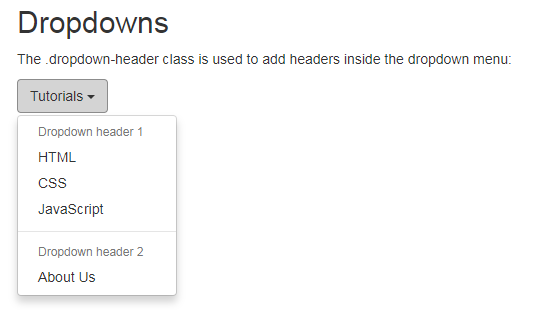
드롭 다운 헤더
이 .dropdown-header클래스는 드롭 다운 메뉴에 헤더를 추가하는 데 사용됩니다.
예제
<!DOCTYPE html>
<html>
<head>
<meta name="viewport" content="width=device-width, initial-scale=1">
<link rel="stylesheet" href="https://maxcdn.bootstrapcdn.com/bootstrap/3.3.7/css/bootstrap.min.css">
<script src="https://ajax.googleapis.com/ajax/libs/jquery/3.2.1/jquery.min.js"></script>
<script src="https://maxcdn.bootstrapcdn.com/bootstrap/3.3.7/js/bootstrap.min.js"></script>
</head>
<body>
<div class="container">
<h2>Dropdowns</h2>
<p>The .dropdown-header class is used to add headers inside the dropdown menu:</p>
<div class="dropdown">
<button class="btn btn-default dropdown-toggle" type="button" data-toggle="dropdown">Tutorials
<span class="caret"></span></button>
<ul class="dropdown-menu">
<li class="dropdown-header">Dropdown header 1</li>
<li><a href="#">HTML</a></li>
<li><a href="#">CSS</a></li>
<li><a href="#">JavaScript</a></li>
<li class="divider"></li>
<li class="dropdown-header">Dropdown header 2</li>
<li><a href="#">About Us</a></li>
</ul>
</div>
</div>
</body>
</html>
이 .dropdown-header클래스는 드롭 다운 메뉴에 헤더를 추가하는 데 사용됩니다.
예제
<!DOCTYPE html>
<html>
<head>
<meta name="viewport" content="width=device-width, initial-scale=1">
<link rel="stylesheet" href="https://maxcdn.bootstrapcdn.com/bootstrap/3.3.7/css/bootstrap.min.css">
<script src="https://ajax.googleapis.com/ajax/libs/jquery/3.2.1/jquery.min.js"></script>
<script src="https://maxcdn.bootstrapcdn.com/bootstrap/3.3.7/js/bootstrap.min.js"></script>
</head>
<body>
<div class="container">
<h2>Dropdowns</h2>
<p>The .dropdown-header class is used to add headers inside the dropdown menu:</p>
<div class="dropdown">
<button class="btn btn-default dropdown-toggle" type="button" data-toggle="dropdown">Tutorials
<span class="caret"></span></button>
<ul class="dropdown-menu">
<li class="dropdown-header">Dropdown header 1</li>
<li><a href="#">HTML</a></li>
<li><a href="#">CSS</a></li>
<li><a href="#">JavaScript</a></li>
<li class="divider"></li>
<li class="dropdown-header">Dropdown header 2</li>
<li><a href="#">About Us</a></li>
</ul>
</div>
</div>
</body>
</html>
첨부파일
댓글 7개

Bottom
7년 전
잘 보고 갑니다. 감사합니다.
7년 전
감사합니다..
7년 전
배우고 가요... 감사
darlylovelydarly
6년 전
감사합니다
choice2
6년 전
감사!!

6년 전
감사히 질 봤습니다.^^
6년 전
감사합니다~
게시판 목록
퍼블리싱강좌
| 번호 | 분류 | 제목 | 글쓴이 | 날짜 | 조회 |
|---|---|---|---|---|---|
| 88 | jQuery Mobile | 8년 전 | 1937 | ||
| 87 | jQuery Mobile | 8년 전 | 1919 | ||
| 86 | jQuery Mobile | 8년 전 | 1529 | ||
| 85 | jQuery Mobile | 8년 전 | 1837 | ||
| 84 | jQuery Mobile | 8년 전 | 1874 | ||
| 83 | jQuery Mobile | 8년 전 | 1887 | ||
| 82 | jQuery Mobile | 8년 전 | 1658 | ||
| 81 | jQuery Mobile | 8년 전 | 1375 | ||
| 80 | jQuery Mobile | 8년 전 | 1812 | ||
| 79 | jQuery Mobile | 8년 전 | 1360 | ||
| 78 | jQuery Mobile | 8년 전 | 1757 | ||
| 77 | jQuery Mobile | 8년 전 | 1783 | ||
| 76 | jQuery Mobile | 8년 전 | 1791 | ||
| 75 | jQuery Mobile | 8년 전 | 1405 | ||
| 74 | jQuery Mobile | 8년 전 | 1543 | ||
| 73 | jQuery Mobile | 8년 전 | 1250 | ||
| 72 | jQuery Mobile | 8년 전 | 1630 | ||
| 71 | jQuery Mobile | 8년 전 | 1623 | ||
| 70 | jQuery Mobile | 8년 전 | 1507 | ||
| 69 | jQuery Mobile | 8년 전 | 1515 | ||
| 68 | jQuery Mobile | 8년 전 | 2051 | ||
| 67 | jQuery Mobile | 8년 전 | 1319 | ||
| 66 | jQuery Mobile | 8년 전 | 1695 | ||
| 65 | jQuery Mobile | 8년 전 | 1188 | ||
| 64 | jQuery Mobile | 8년 전 | 1468 | ||
| 63 | jQuery Mobile | 8년 전 | 1659 | ||
| 62 | jQuery Mobile | 8년 전 | 1644 | ||
| 61 | jQuery Mobile | 8년 전 | 1878 | ||
| 60 | jQuery Mobile | 8년 전 | 1412 | ||
| 59 | jQuery Mobile | 8년 전 | 1968 |
댓글 작성
댓글을 작성하시려면 로그인이 필요합니다.
로그인하기