
안녕하세요.
질문이 있는데,
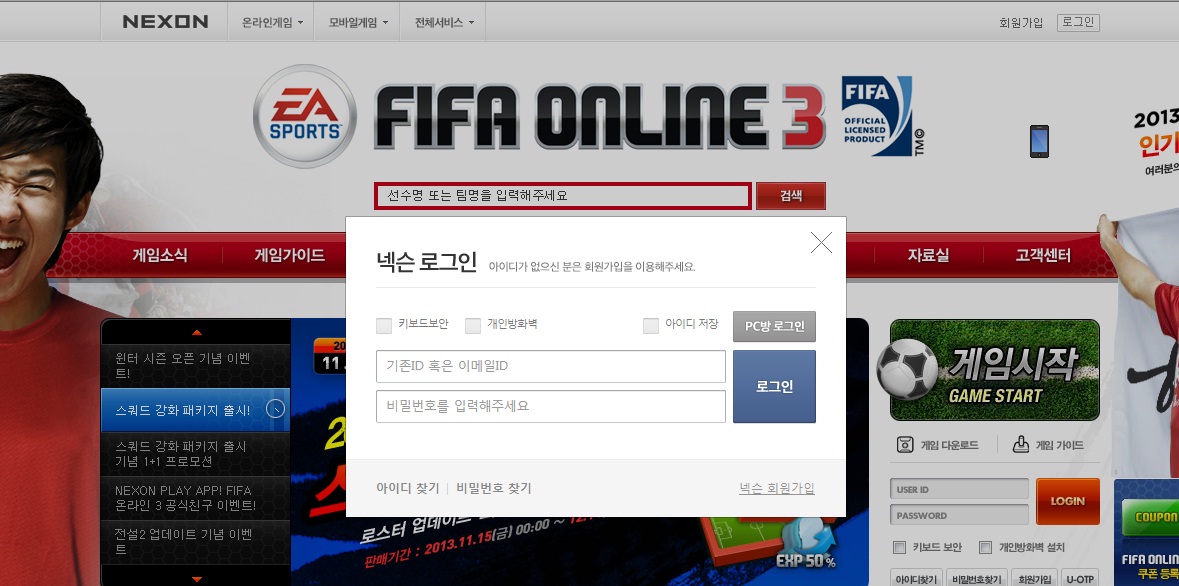
첨부한 이미지에 보면 로그인을 누루면 백그라운드에 로그인창 뜨면서
첨부한 이미지대로 나오려면 어떻게 해야하죠?
아시는분들 답변좀 부탁드려요~
질문이 있는데,
첨부한 이미지에 보면 로그인을 누루면 백그라운드에 로그인창 뜨면서
첨부한 이미지대로 나오려면 어떻게 해야하죠?
아시는분들 답변좀 부탁드려요~
댓글 5개
12년 전
이걸사용하세요
<!DOCTYPE html PUBLIC "-//W3C//DTD XHTML 1.0 Transitional//EN" "http://www.w3.org/TR/xhtml1/DTD/xhtml1-transitional.dtd">
<html xmlns="http://www.w3.org/1999/xhtml">
<head>
<title>--</title>
<style>
html,body{font-size:12px;margin:0px;height:100%;}
.mesWindow{border:#666 1px solid;background:#fff;}
.mesWindowTop{border-bottom:#eee 1px solid;margin-left:4px;padding:3px;font-weight:bold;text-align:left;font-size:12px;}
.mesWindowContent{margin:4px;font-size:12px;}
.mesWindow .close{height:15px;width:28px;border:none;cursor:pointer;text-decoration:underline;background:#fff}
</style>
<script>
var isIe=(document.all)?true:false;
function setSelectState(state)
{
var objl=document.getElementsByTagName('select');
for(var i=0;i<objl.length;i++)
{
objl[i].style.visibility=state;
}
}
function mousePosition(ev)
{
if(ev.pageX || ev.pageY)
{
return {x:ev.pageX, y:ev.pageY};
}
return {
x:ev.clientX + document.body.scrollLeft - document.body.clientLeft,y:ev.clientY + document.body.scrollTop - document.body.clientTop
};
}
//튀여나오는 스타일
function showMessageBox(wTitle,content,pos,wWidth)
{
closeWindow();
var bWidth=parseInt(document.documentElement.scrollWidth);
var bHeight=parseInt(document.documentElement.scrollHeight);
if(isIe){
setSelectState('hidden');}
var back=document.createElement("div");
back.id="back";
var styleStr="top:0px;left:0px;position:absolute;background:#666;width:"+bWidth+"px;height:"+bHeight+"px;";
styleStr+=(isIe)?"filter:alpha(opacity=0);":"opacity:0;";
back.style.cssText=styleStr;
document.body.appendChild(back);
showBackground(back,50);
var mesW=document.createElement("div");
mesW.id="mesWindow";
mesW.className="mesWindow";
mesW.innerHTML="<div class='mesWindowTop'><table width='100%' height='100%'><tr><td>"+wTitle+"</td><td style='width:1px;'><input type='button' onclick='closeWindow();' title='닫기' class='close' value='닫기' /></td></tr></table></div><div class='mesWindowContent' id='mesWindowContent'>"+content+"</div><div class='mesWindowBottom'></div>";
styleStr="left:"+(((pos.x-wWidth)>0)?(pos.x-wWidth):pos.x)+"px;top:"+(pos.y)+"px;position:absolute;width:"+wWidth+"px;";
mesW.style.cssText=styleStr;
document.body.appendChild(mesW);
}
//배경점점 검게
function showBackground(obj,endInt)
{
if(isIe)
{
obj.filters.alpha.opacity+=1;
if(obj.filters.alpha.opacity<endInt)
{
setTimeout(function(){showBackground(obj,endInt)},5);
}
}else{
var al=parseFloat(obj.style.opacity);al+=0.01;
obj.style.opacity=al;
if(al<(endInt/100))
{setTimeout(function(){showBackground(obj,endInt)},5);}
}
}
//닫기
function closeWindow()
{
if(document.getElementById('back')!=null)
{
document.getElementById('back').parentNode.removeChild(document.getElementById('back'));
}
if(document.getElementById('mesWindow')!=null)
{
document.getElementById('mesWindow').parentNode.removeChild(document.getElementById('mesWindow'));
}
if(isIe){
setSelectState('');}
}
function testMessageBox(ev)
{
var objPos = mousePosition(ev);
messContent="<div style='padding:20px 0 20px 0;text-align:center'>내용</div>";
showMessageBox('제목',messContent,objPos,350);
}
</script>
</head>
<body>
<div style="padding:20px">
<div style="text-align:left";><a href="#none" onclick="testMessageBox(event);">열기</a></div>
</div>
</body>
</html>
<!DOCTYPE html PUBLIC "-//W3C//DTD XHTML 1.0 Transitional//EN" "http://www.w3.org/TR/xhtml1/DTD/xhtml1-transitional.dtd">
<html xmlns="http://www.w3.org/1999/xhtml">
<head>
<title>--</title>
<style>
html,body{font-size:12px;margin:0px;height:100%;}
.mesWindow{border:#666 1px solid;background:#fff;}
.mesWindowTop{border-bottom:#eee 1px solid;margin-left:4px;padding:3px;font-weight:bold;text-align:left;font-size:12px;}
.mesWindowContent{margin:4px;font-size:12px;}
.mesWindow .close{height:15px;width:28px;border:none;cursor:pointer;text-decoration:underline;background:#fff}
</style>
<script>
var isIe=(document.all)?true:false;
function setSelectState(state)
{
var objl=document.getElementsByTagName('select');
for(var i=0;i<objl.length;i++)
{
objl[i].style.visibility=state;
}
}
function mousePosition(ev)
{
if(ev.pageX || ev.pageY)
{
return {x:ev.pageX, y:ev.pageY};
}
return {
x:ev.clientX + document.body.scrollLeft - document.body.clientLeft,y:ev.clientY + document.body.scrollTop - document.body.clientTop
};
}
//튀여나오는 스타일
function showMessageBox(wTitle,content,pos,wWidth)
{
closeWindow();
var bWidth=parseInt(document.documentElement.scrollWidth);
var bHeight=parseInt(document.documentElement.scrollHeight);
if(isIe){
setSelectState('hidden');}
var back=document.createElement("div");
back.id="back";
var styleStr="top:0px;left:0px;position:absolute;background:#666;width:"+bWidth+"px;height:"+bHeight+"px;";
styleStr+=(isIe)?"filter:alpha(opacity=0);":"opacity:0;";
back.style.cssText=styleStr;
document.body.appendChild(back);
showBackground(back,50);
var mesW=document.createElement("div");
mesW.id="mesWindow";
mesW.className="mesWindow";
mesW.innerHTML="<div class='mesWindowTop'><table width='100%' height='100%'><tr><td>"+wTitle+"</td><td style='width:1px;'><input type='button' onclick='closeWindow();' title='닫기' class='close' value='닫기' /></td></tr></table></div><div class='mesWindowContent' id='mesWindowContent'>"+content+"</div><div class='mesWindowBottom'></div>";
styleStr="left:"+(((pos.x-wWidth)>0)?(pos.x-wWidth):pos.x)+"px;top:"+(pos.y)+"px;position:absolute;width:"+wWidth+"px;";
mesW.style.cssText=styleStr;
document.body.appendChild(mesW);
}
//배경점점 검게
function showBackground(obj,endInt)
{
if(isIe)
{
obj.filters.alpha.opacity+=1;
if(obj.filters.alpha.opacity<endInt)
{
setTimeout(function(){showBackground(obj,endInt)},5);
}
}else{
var al=parseFloat(obj.style.opacity);al+=0.01;
obj.style.opacity=al;
if(al<(endInt/100))
{setTimeout(function(){showBackground(obj,endInt)},5);}
}
}
//닫기
function closeWindow()
{
if(document.getElementById('back')!=null)
{
document.getElementById('back').parentNode.removeChild(document.getElementById('back'));
}
if(document.getElementById('mesWindow')!=null)
{
document.getElementById('mesWindow').parentNode.removeChild(document.getElementById('mesWindow'));
}
if(isIe){
setSelectState('');}
}
function testMessageBox(ev)
{
var objPos = mousePosition(ev);
messContent="<div style='padding:20px 0 20px 0;text-align:center'>내용</div>";
showMessageBox('제목',messContent,objPos,350);
}
</script>
</head>
<body>
<div style="padding:20px">
<div style="text-align:left";><a href="#none" onclick="testMessageBox(event);">열기</a></div>
</div>
</body>
</html>
Terrorboy
12년 전
모달창이라고 검색 해보세요~
12년 전
음..div 팝업에 대해서 배우시고 target= parent 이걸로 검색하시면 됩니다. 그리고 비동기 ajax쪽으로 보시면 됩니다.
skypro
12년 전
그냥 간단하게 레이어로 띄우시면 됩니다. div 하나 만들어놓고 로그인 버튼 클릭하면 레이어를 href시켜주면 될듯....^^
배경 검은색도 간단히 bg를 레이어로 하나 덮으면 간단합니다. 어렵게 처리할 필요가 없을 듯합니다 ..도움되시길
배경 검은색도 간단히 bg를 레이어로 하나 덮으면 간단합니다. 어렵게 처리할 필요가 없을 듯합니다 ..도움되시길
12년 전
여기 스킨방에서 검색해 보시면 나옵니다..참고하시길..
게시판 목록
프로그램
| 번호 | 제목 | 글쓴이 | 날짜 | 조회 |
|---|---|---|---|---|
| 8230 | 9년 전 | 194 | ||
| 8229 | 9년 전 | 175 | ||
| 8228 |
커네드커네드
|
9년 전 | 215 | |
| 8227 | 9년 전 | 253 | ||
| 8226 | 9년 전 | 275 | ||
| 8225 | 9년 전 | 256 | ||
| 8224 | 9년 전 | 261 | ||
| 8223 | 9년 전 | 241 | ||
| 8222 |
 웹표준3년차 웹표준3년차 |
9년 전 | 302 | |
| 8221 | 9년 전 | 199 | ||
| 8220 | 9년 전 | 242 | ||
| 8219 | 9년 전 | 217 | ||
| 8218 | 9년 전 | 259 | ||
| 8217 |
star3840
|
9년 전 | 218 | |
| 8216 | 9년 전 | 293 | ||
| 8215 | 9년 전 | 241 | ||
| 8214 | 9년 전 | 344 | ||
| 8213 | 9년 전 | 304 | ||
| 8212 | 9년 전 | 218 | ||
| 8211 | 9년 전 | 388 | ||
| 8210 | 9년 전 | 383 | ||
| 8209 | 9년 전 | 464 | ||
| 8208 | 9년 전 | 345 | ||
| 8207 | 9년 전 | 360 | ||
| 8206 |
 웹의미래는딥러닝 웹의미래는딥러닝 |
9년 전 | 307 | |
| 8205 | 9년 전 | 280 | ||
| 8204 | 9년 전 | 269 | ||
| 8203 | 9년 전 | 345 | ||
| 8202 | 9년 전 | 254 | ||
| 8201 | 9년 전 | 298 | ||
| 8200 | 9년 전 | 302 | ||
| 8199 | 9년 전 | 326 | ||
| 8198 | 9년 전 | 287 | ||
| 8197 | 9년 전 | 281 | ||
| 8196 | 9년 전 | 701 | ||
| 8195 | 9년 전 | 289 | ||
| 8194 | 9년 전 | 396 | ||
| 8193 | 9년 전 | 311 | ||
| 8192 | 9년 전 | 313 | ||
| 8191 | 9년 전 | 277 | ||
| 8190 | 9년 전 | 257 | ||
| 8189 | 9년 전 | 320 | ||
| 8188 | 9년 전 | 253 | ||
| 8187 | 9년 전 | 269 | ||
| 8186 | 9년 전 | 268 | ||
| 8185 | 9년 전 | 438 | ||
| 8184 | 9년 전 | 221 | ||
| 8183 | 9년 전 | 427 | ||
| 8182 | 9년 전 | 298 | ||
| 8181 | 9년 전 | 249 | ||
| 8180 | 9년 전 | 826 | ||
| 8179 | 9년 전 | 604 | ||
| 8178 | 9년 전 | 460 | ||
| 8177 |
kiplayer
|
9년 전 | 457 | |
| 8176 | 9년 전 | 491 | ||
| 8175 | 9년 전 | 376 | ||
| 8174 | 9년 전 | 370 | ||
| 8173 | 9년 전 | 458 | ||
| 8172 | 9년 전 | 338 | ||
| 8171 | 9년 전 | 303 | ||
| 8170 | 9년 전 | 420 | ||
| 8169 |
커네드커네드
|
9년 전 | 370 | |
| 8168 | 9년 전 | 457 | ||
| 8167 | 9년 전 | 447 | ||
| 8166 | 9년 전 | 347 | ||
| 8165 | 9년 전 | 285 | ||
| 8164 | 9년 전 | 417 | ||
| 8163 | 9년 전 | 420 | ||
| 8162 | 9년 전 | 402 | ||
| 8161 | 9년 전 | 422 | ||
| 8160 |
 성격파탄자 성격파탄자 |
9년 전 | 640 | |
| 8159 | 9년 전 | 584 | ||
| 8158 | 9년 전 | 382 | ||
| 8157 | 9년 전 | 504 | ||
| 8156 | 9년 전 | 376 | ||
| 8155 | 9년 전 | 387 | ||
| 8154 |
00년생용띠
|
9년 전 | 709 | |
| 8153 | 9년 전 | 350 | ||
| 8152 |
 닉네임없음 닉네임없음 |
9년 전 | 526 | |
| 8151 | 9년 전 | 518 | ||
| 8150 | 9년 전 | 637 | ||
| 8149 |
Jangfolk
|
9년 전 | 496 | |
| 8148 | 9년 전 | 310 | ||
| 8147 | 9년 전 | 495 | ||
| 8146 | 9년 전 | 575 | ||
| 8145 | 9년 전 | 534 | ||
| 8144 | 9년 전 | 502 | ||
| 8143 | 9년 전 | 327 | ||
| 8142 | 9년 전 | 548 | ||
| 8141 | 9년 전 | 487 | ||
| 8140 | 9년 전 | 1062 | ||
| 8139 | 9년 전 | 397 | ||
| 8138 |
전갈자리남자
|
9년 전 | 507 | |
| 8137 | 9년 전 | 546 | ||
| 8136 | 9년 전 | 873 | ||
| 8135 |
|
9년 전 | 921 | |
| 8134 |
PlayPixel
|
9년 전 | 661 | |
| 8133 |
 돼지코구뇽 돼지코구뇽 |
9년 전 | 561 | |
| 8132 | 9년 전 | 592 | ||
| 8131 | 9년 전 | 953 |




댓글 작성
댓글을 작성하시려면 로그인이 필요합니다.
로그인하기