
SNS 네이버로그인시 전화번호 가져오기
네이버로그인api 전화번호가져오기가 체크되있어도
그누에 mobile 값이 없어서 전화번호를 가져오지 하는데..
그 값만 추가하면 전화번호를 가져와서 공유합니다.
1] 첫번째
plugin/social/Hybrid/Providers/Naver.php
검색
$this->user->profile->username = (array_key_exists('name', $data)) ? $data['name'] : "";
하단 추가
$this->user->profile->mobile = (array_key_exists('mobile', $data)) ? $data['mobile'] : "";
예시)
$this->user->profile->username = (array_key_exists('name', $data)) ? $data['name'] : "";
$this->user->profile->mobile = (array_key_exists('mobile', $data)) ? $data['mobile'] : "";
2] 두번째
plugin/social/register_member.php
검색
$user_name = isset($user_profile->username) ? $user_profile->username : '';
하단 추가
$user_mobile = isset($user_profile->mobile) ? $user_profile->mobile : '';
예시)
$user_name = isset($user_profile->username) ? $user_profile->username : '';
$user_mobile = isset($user_profile->mobile) ? $user_profile->mobile : '';
3] 세번째
skin/social/social_register_member.php
검색
<tr>
<th scope="row"><label for="reg_mb_email">E-mail<strong class="sound_only">필수</strong></label></th>
<td>
<input type="text" name="mb_email" value="<?php echo isset($user_email)?$user_email:''; ?>" id="reg_mb_email" required class="frm_input email required" size="70" maxlength="100" placeholder="이메일을 입력해주세요." >
<p class="email_msg"><?php echo $email_msg; ?></p>
</td>
</tr>
하단추가
네이버 인증하고 확인시 나오는 화면입니다.
전화번호를 노출하고 싶으시면 하단내용을 추가하면
<tr>
<th scope="row"><label for="mb_hp">mb_hp<strong class="sound_only">필수</strong></label></th>
<td>
<input type="text" name="mb_hp" value="<?php echo isset($user_mobile)?$user_mobile:''; ?>" id="mb_hp" required class="frm_input" size="70" maxlength="100" placeholder="전화번호를 입력해주세요." >
</td>
</tr>
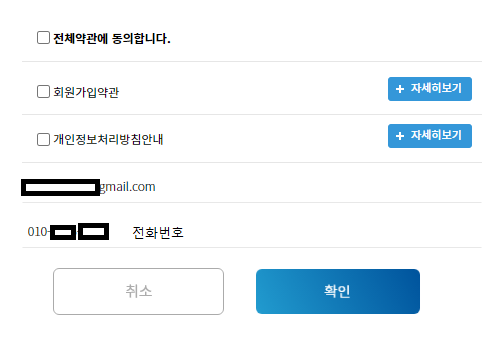
이런 화면에 전화번호칸이 노출이됩니다. 노출을 원하시지않으시면
검색 ]
<input type="text" name="mb_email" value="<?php echo isset($user_email)?$user_email:''; ?>" id="reg_mb_email" required class="frm_input email required" size="70" maxlength="100" placeholder="이메일을 입력해주세요." >
하단추가
<input type="hidden" name="mb_hp" value="<?php echo isset($user_mobile)?$user_mobile:''; ?>">
위에 코드를 넣어주시면 노출은 되지않습니다.
4] 네번째
plugin/social/register_member_update.php
검색
$mb_email = get_email_address($mb_email);
하단 추가
$mb_hp = isset($_POST['mb_hp']) ? trim($_POST['mb_hp']) : "";
검색
mb_email = '{$mb_email}',
하단 추가
mb_hp = '{$mb_hp}',
전화번호가 추가됩니다.
댓글 11개





감사합니다.. 좋아요
감사합니다

와우 현재까지 이 로직 잘 되네요~ 이걸로 해결했습니다 감사드려요!!!
참 세번째,
skin/social/social_register_member.php가 social_register_member.skin.php로 바뀐 듯합니다.
전
<div class="form-group mb-4">
<label for="reg_mb_email">이메일</label>
<input type="text" name="mb_email" value="<?php echo isset($user_email)?$user_email:''; ?>" id="reg_mb_email" required class="form-control email" maxlength="100" placeholder="이메일">
</div>
이메일 아래에
<div class="form-group mb-4">
<label for="mb_hp">휴대폰</label>
<input type="text" name="mb_hp" value="<?php echo isset($user_mobile)?$user_mobile:''; ?>" id="mb_hp" required class="form-control" maxlength="100" placeholder="휴대폰번호">
</div>
이런 식으로 추가하고 디비에 값이 들어갔습니다.
그누보드 Version 5.5.16에서도 잘되고 있네요 감사합니다!!!
너무 감사합니다 ㅠㅠ
너무 감사합니다 ㅠㅠ 2
게시판 목록
그누보드5 팁자료실
| 번호 | 제목 | 글쓴이 | 날짜 | 조회 |
|---|---|---|---|---|
| 공지 | 3년 전 | 4427 | ||
| 2604 | 8개월 전 | 676 | ||
| 2603 | 8개월 전 | 735 | ||
| 2602 | 8개월 전 | 649 | ||
| 2601 |
 glitter0gim glitter0gim |
8개월 전 | 672 | |
| 2600 |
glitter0gim |
8개월 전 | 580 | |
| 2599 | 8개월 전 | 809 | ||
| 2598 | 8개월 전 | 604 | ||
| 2597 |
다케미카코
|
8개월 전 | 757 | |
| 2596 | 9개월 전 | 854 | ||
| 2595 |
 위토즈소프트 위토즈소프트 |
9개월 전 | 446 | |
| 2594 | 9개월 전 | 608 | ||
| 2593 |
만두먹고또먹고
|
9개월 전 | 938 | |
| 2592 | 9개월 전 | 614 | ||
| 2591 | 9개월 전 | 620 | ||
| 2590 | 9개월 전 | 690 | ||
| 2589 |
 팬텀디자인 팬텀디자인 |
9개월 전 | 760 | |
| 2588 | 9개월 전 | 479 | ||
| 2587 | 9개월 전 | 796 | ||
| 2586 | 9개월 전 | 645 | ||
| 2585 | 9개월 전 | 511 | ||
| 2584 | 9개월 전 | 579 | ||
| 2583 | 9개월 전 | 499 | ||
| 2582 | 9개월 전 | 644 | ||
| 2581 | 9개월 전 | 601 | ||
| 2580 |
만두먹고또먹고
|
9개월 전 | 517 | |
| 2579 |
위토즈소프트 |
9개월 전 | 666 | |
| 2578 | 9개월 전 | 649 | ||
| 2577 | 9개월 전 | 629 | ||
| 2576 | 10개월 전 | 562 | ||
| 2575 |
이슈DEV
|
10개월 전 | 993 |


댓글 작성
댓글을 작성하시려면 로그인이 필요합니다.
로그인하기