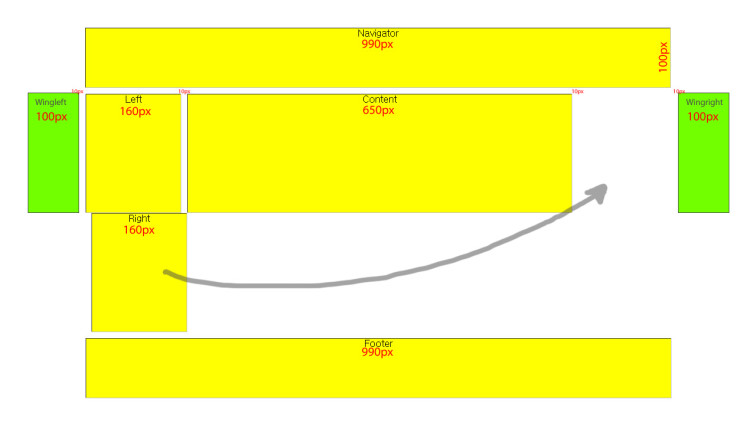
안녕하세요~
CSS 초보자입니다....^^
CSS를 이용한 DIV 레이아웃과 관련하여 2가지 문의를 드려봅니다.
아래 소스로 레이아웃을 잡았습니다.
--------------------------------------------------------------------------
<!DOCTYPE html PUBLIC "-//W3C//DTD XHTML 1.0 Transitional//EN" "http://www.w3.org/TR/xhtml1/DTD/xhtml1-transitional.dtd">
<html xmlns="http://www.w3.org/1999/xhtml">
<head>
<title>div 태그로 레이아웃 설정</title>
<style type="text/css">
body { text-align:center; width:100%; height:100%;}
#header {
width:990px; height:100px; background-color:Yellow; border:groove 1px silver;
padding:0px 0px 0px 0px; margin:0px 0px 10px 0px;}
#left{
width:160px; height:200px; background-color:Yellow; border:groove 1px silver;
padding:0px 0px 0px 0px; margin:0px 10px 0px 0px;
float:left;}
#content{
width:650px; height:200px; background-color:Yellow; border:groove 1px silver;
padding:0px 0px 0px 0px; margin:0px 0px 0px 0px;
float:left;}
#right{
width:160px; height:200px; background-color:Yellow; border:groove 1px silver;
padding:0px 0px 0px 0px; margin:0px 0px 0px 10px;
float:left;}
#footer{
width:990px; height:100px; background-color:Yellow; border:groove 1px silver;
padding:0px 0px 0px 0px; margin:10px 0px 0px 0px;
float:left;}
</style>
<head>
<title>div 태그로 레이아웃 설정</title>
<style type="text/css">
body { text-align:center; width:100%; height:100%;}
#header {
width:990px; height:100px; background-color:Yellow; border:groove 1px silver;
padding:0px 0px 0px 0px; margin:0px 0px 10px 0px;}
#left{
width:160px; height:200px; background-color:Yellow; border:groove 1px silver;
padding:0px 0px 0px 0px; margin:0px 10px 0px 0px;
float:left;}
#content{
width:650px; height:200px; background-color:Yellow; border:groove 1px silver;
padding:0px 0px 0px 0px; margin:0px 0px 0px 0px;
float:left;}
#right{
width:160px; height:200px; background-color:Yellow; border:groove 1px silver;
padding:0px 0px 0px 0px; margin:0px 0px 0px 10px;
float:left;}
#footer{
width:990px; height:100px; background-color:Yellow; border:groove 1px silver;
padding:0px 0px 0px 0px; margin:10px 0px 0px 0px;
float:left;}
</style>
</head>
<body leftmargin="3" marginwidth="3" topmargin="3" marginheight="3">
<div id="header">Navigator</div>
<div style="width:990px;">
<div id="left">Left</div>
<div id="content">Content</div>
<div id="right">Right</div>
<div id="footer">Footer</div>
</div>
</body>
</html>
-----------------------------------------------------------------
<궁금증 1>
첨부한 그림에서 보시다시파 "Right" 칸이 아래로 밀려납니다.... ㅡ.ㅡ;;
무엇이 잘못되었는지, 어느 부분을 수정하면 되는지 도움 말씀 부탁드립니다.
<궁금증 2>
첨부한 그림에서 보시면 좌측, 우측에 보시면 파란색 박스로 배너를 달려고 합니다.
인터넷 검색해서 비슷한 유형의 소스들을 퍼다가 붙혀 보았는데... 내공부족으로 안됩니다.... ㅠ.ㅠ
위 소스를 어떻게 구현하면 되는지... 함께 도움 말씀 부탁드립니다~
이곳 부산에는 이제 벛꽃망울둘이 제법 커졌습니다.
다음주면 활짝 만개를 할것 같군요.
주말에 봄내음 맏으면서 즐거운 시간 보내시기 바랍니다.
감사합니다~
2012.4.6
부산에서 SIR 사용자 드림

댓글 13개
cshop
13년 전
일단 div 는 테이블이 아닙니다. div 는 division 의 약자 입니다. 이렇게 생각하시면 쉬워요.
종이가 한장 있습니다. 그 종이를 여러 조각으로 나누는 겁니다. 저 위의 그림은 종이의 넓이가 990 인데 어떻게 divide 하면 100, 160, 650, 100 으로 나눌수 있을까요?
불가능한거죠. 제일 상단의 div 가 100, 160, 650, 100 을 합한 수 보다 더 넓어야 하는겁니다.
그리고 저 위의 레이아웃은 이렇게 짜면 되겠죠.
<style>
.최신글 { padding: 20px;border: 1px solid grey; float: left}
#최신글1 { width:100px;background-color:yellow;}
#최신글2 { width: 100px;background-color:red;}
#최신글3 { width: 100px;background-color:orange;}
#최신글4 { width: 100px;background-color:green;}
.위아래 { width: 500px; background-color:blue;}
}
</style>
<div class="위아래">header</div>
<div id="최신글1" class="최신글">1 </div>
<div id="최신글2" class="최신글">2</div>
<div id="최신글3" class="최신글">3</div>
<div id="최신글4" class="최신글">4</div>
<div class="위아래">footer</div>
확인 안해봤는데, 아마 맞을거에요.
종이가 한장 있습니다. 그 종이를 여러 조각으로 나누는 겁니다. 저 위의 그림은 종이의 넓이가 990 인데 어떻게 divide 하면 100, 160, 650, 100 으로 나눌수 있을까요?
불가능한거죠. 제일 상단의 div 가 100, 160, 650, 100 을 합한 수 보다 더 넓어야 하는겁니다.
그리고 저 위의 레이아웃은 이렇게 짜면 되겠죠.
<style>
.최신글 { padding: 20px;border: 1px solid grey; float: left}
#최신글1 { width:100px;background-color:yellow;}
#최신글2 { width: 100px;background-color:red;}
#최신글3 { width: 100px;background-color:orange;}
#최신글4 { width: 100px;background-color:green;}
.위아래 { width: 500px; background-color:blue;}
}
</style>
<div class="위아래">header</div>
<div id="최신글1" class="최신글">1 </div>
<div id="최신글2" class="최신글">2</div>
<div id="최신글3" class="최신글">3</div>
<div id="최신글4" class="최신글">4</div>
<div class="위아래">footer</div>
확인 안해봤는데, 아마 맞을거에요.

13년 전
일하는 중이라 간단하게 수정해봤습니다.
익스9에서만 테스트해봤습니다.
<!DOCTYPE html PUBLIC "-//W3C//DTD XHTML 1.0 Transitional//EN" "http://www.w3.org/TR/xhtml1/DTD/xhtml1-transitional.dtd">
<html xmlns="http://www.w3.org/1999/xhtml">
<head>
<title>div 태그로 레이아웃 설정</title>
<style type="text/css">
body { text-align:center; margin:0; padding:0; width:100%; height:100%;}
#wrapper {
margin:0 auto; width:1210px;
}
#wingleft {
float:left; margin-top:110px; margin-right:10px; width:100px; height:100px; border:1px solid silver; background:yellow;
}
#wingright {
float:right; margin-top:110px; width:100px; height:100px; border:1px solid silver; background:yellow;
}
#wrapperb {
float:left; margin:0 auto; width: 990px;
}
#header {
width:990px; height:100px; background-color:Yellow; border:groove 1px silver;
padding:0px 0px 0px 0px; margin:0px auto 10px;}
#left{
width:160px; height:200px; background-color:Yellow; border:groove 1px silver;
padding:0px 0px 0px 0px; margin:0px 10px 0px 0px;
float:left;}
#content{
width:650px; height:200px; background-color:Yellow; border:groove 1px silver;
padding:0px 0px 0px 0px; margin:0px 0px 0px 0px;
float:left;}
#right{
width:160px; height:200px; background-color:Yellow; border:groove 1px silver;
padding:0px 0px 0px 0px; float:right;}
#footer{
width:990px; height:100px; background-color:Yellow; border:groove 1px silver;
padding:0px 0px 0px 0px; margin:10px 0px 0px 0px;
float:left;}
</style>
</head>
<body>
<div id="wrapper">
<div id="wingleft">wingleft</div>
<div id="wrapperb">
<div id="header">Navigator</div>
<div style="float:left;width:990px;">
<div id="left">Left</div>
<div id="content">Content</div>
<div id="right">Right</div>
<div id="footer">Footer</div>
</div>
</div>
<div id="wingright">wingright</div>
</div>
</body>
</html>
익스9에서만 테스트해봤습니다.
<!DOCTYPE html PUBLIC "-//W3C//DTD XHTML 1.0 Transitional//EN" "http://www.w3.org/TR/xhtml1/DTD/xhtml1-transitional.dtd">
<html xmlns="http://www.w3.org/1999/xhtml">
<head>
<title>div 태그로 레이아웃 설정</title>
<style type="text/css">
body { text-align:center; margin:0; padding:0; width:100%; height:100%;}
#wrapper {
margin:0 auto; width:1210px;
}
#wingleft {
float:left; margin-top:110px; margin-right:10px; width:100px; height:100px; border:1px solid silver; background:yellow;
}
#wingright {
float:right; margin-top:110px; width:100px; height:100px; border:1px solid silver; background:yellow;
}
#wrapperb {
float:left; margin:0 auto; width: 990px;
}
#header {
width:990px; height:100px; background-color:Yellow; border:groove 1px silver;
padding:0px 0px 0px 0px; margin:0px auto 10px;}
#left{
width:160px; height:200px; background-color:Yellow; border:groove 1px silver;
padding:0px 0px 0px 0px; margin:0px 10px 0px 0px;
float:left;}
#content{
width:650px; height:200px; background-color:Yellow; border:groove 1px silver;
padding:0px 0px 0px 0px; margin:0px 0px 0px 0px;
float:left;}
#right{
width:160px; height:200px; background-color:Yellow; border:groove 1px silver;
padding:0px 0px 0px 0px; float:right;}
#footer{
width:990px; height:100px; background-color:Yellow; border:groove 1px silver;
padding:0px 0px 0px 0px; margin:10px 0px 0px 0px;
float:left;}
</style>
</head>
<body>
<div id="wrapper">
<div id="wingleft">wingleft</div>
<div id="wrapperb">
<div id="header">Navigator</div>
<div style="float:left;width:990px;">
<div id="left">Left</div>
<div id="content">Content</div>
<div id="right">Right</div>
<div id="footer">Footer</div>
</div>
</div>
<div id="wingright">wingright</div>
</div>
</body>
</html>
cshop
13년 전
이건 cheating 이야... 왜 wrapper 를 1210px 로 잡아서 씌우냐구요... 저 그림에 wrapper div 가 어디있어요!!!!
ㅋㅋㅋ
ㅋㅋㅋ
13년 전
가운데정렬을 원하실까봐요 ㅋㅋ
제 작은 성의입니다. 부끄부끄
제 작은 성의입니다. 부끄부끄
13년 전
궁금증1 번에 대한 '색다른' 답변:
border도 픽셀을 잡아먹습니다. 그래서 위 예제의 가운데 부분 총 폭은
1+160+1 + 1+650+1 + 1+160+1 > 990
이기에 밀려났습니다. :)
border도 픽셀을 잡아먹습니다. 그래서 위 예제의 가운데 부분 총 폭은
1+160+1 + 1+650+1 + 1+160+1 > 990
이기에 밀려났습니다. :)
13년 전
'정확한' 답변인 거 같은데요. ^^
13년 전
<!DOCTYPE html PUBLIC "-//W3C//DTD XHTML 1.0 Transitional//EN" "http://www.w3.org/TR/xhtml1/DTD/xhtml1-transitional.dtd">
<html xmlns="http://www.w3.org/1999/xhtml">
<head>
<title>div 태그로 레이아웃 설정</title>
<style type="text/css">
body { text-align:center; width:100%; height:100%;}
#header {
width:994px; height:100px; background-color:Yellow;border:groove 1px silver;
padding:0px 0px 0px 0px; margin:0px 0px 10px 0px;}
#left{
width:160px; height:200px; background-color:Yellow;border:groove 1px silver;
padding:0px 0px 0px 0px; margin:0px 10px 0px 0px;
float:left;}
#content{
width:650px; height:200px; background-color:Yellow;border:groove 1px silver;
padding:0px 0px 0px 0px; margin:0px 0px 0px 0px;
float:left;}
#right{
width:160px; height:200px; background-color:Yellow;border:groove 1px silver;
padding:0px 0px 0px 0px; margin:0px 0px 0px 10px;
float:left;}
#footer{
width:994px; height:100px; background-color:Yellow;border:groove 1px silver;
padding:0px 0px 0px 0px; margin:10px 0px 0px 0px;
float:left;}
</style>
</head>
<body leftmargin="3" marginwidth="3" topmargin="3" marginheight="3">
<div id="header">Navigator</div>
<div style="width:996px;">
<div id="left">Left</div>
<div id="content">Content</div>
<div id="right">Right</div>
<div id="footer">Footer</div>
</div>
</body>
</html>
<html xmlns="http://www.w3.org/1999/xhtml">
<head>
<title>div 태그로 레이아웃 설정</title>
<style type="text/css">
body { text-align:center; width:100%; height:100%;}
#header {
width:994px; height:100px; background-color:Yellow;border:groove 1px silver;
padding:0px 0px 0px 0px; margin:0px 0px 10px 0px;}
#left{
width:160px; height:200px; background-color:Yellow;border:groove 1px silver;
padding:0px 0px 0px 0px; margin:0px 10px 0px 0px;
float:left;}
#content{
width:650px; height:200px; background-color:Yellow;border:groove 1px silver;
padding:0px 0px 0px 0px; margin:0px 0px 0px 0px;
float:left;}
#right{
width:160px; height:200px; background-color:Yellow;border:groove 1px silver;
padding:0px 0px 0px 0px; margin:0px 0px 0px 10px;
float:left;}
#footer{
width:994px; height:100px; background-color:Yellow;border:groove 1px silver;
padding:0px 0px 0px 0px; margin:10px 0px 0px 0px;
float:left;}
</style>
</head>
<body leftmargin="3" marginwidth="3" topmargin="3" marginheight="3">
<div id="header">Navigator</div>
<div style="width:996px;">
<div id="left">Left</div>
<div id="content">Content</div>
<div id="right">Right</div>
<div id="footer">Footer</div>
</div>
</body>
</html>
13년 전
* 아래의 설명은 표준 브라우저를 기준으로 작성함을 알려드립니다.
* 오류없이 작성하려 꽤 노력은 하였지만 혹시라도 작성에 오류가 있다면 알려주시기 바랍니다.
* 설명에 관한 궁금증 및 오류의 지적은 댓글 또는 쪽지로 남겨주시면 참고하여 수정하겠습니다.
<궁금증 1에 대한 답>
1. #header {width:990px; height:100px; background-color:Yellow; border:groove 1px silver; padding:0px 0px 0px 0px; margin:0px 0px 10px 0px;}
- 위의 헤더 소스를 보면 박스 너비가 990px, 높이가 100px, 테두리 (상,하,좌,우) 선의 굵기가 1픽셀입니다.
- 위의 소스는 테두리를 뺀 크기가 너비 990px, 높이가 100px 이라는 뜻이며,
- 1px의 테두리를 그렸다면 실제 너비는 992px, 높이가 102px 이라는 뜻입니다.
2. 그런데 블랙님의 소스를 해석해보면
- #header 의 크기는 테두리 선을 포함하여 너비 992px, 높이 202px 이며
- #left 의 크기는 테두리 선을 포함하여 너비 162px, 높이 202px
- #content 의 크기는 테두리 선을 포함하여 너비 652px, 높이 202px
- #right 의 크기는 테두리 선을 포함하여 너비 162px, 높이 202px 입니다.
3. 여기에서 header의 너비 992px 이며 그 아래에 일렬로 배치하려는 left + content + right 의 너비 합은 976px 이며
left 와 content 사이에 10px의 공간(margin 값)을 주었고, content 와 right 사이에 10px의 공간(margin 값)을 준다면
left, content, right 가 배열되면 실제 너비 (가로) 가 996px 이 됩니다.
4. 그래서 아래와 같이 소스의 수정이 필요합니다. (위의 '아이존' 님의 설명과 같습니다.)
- 수정부분 1 : header 와 footer 의 너비를 994px 로 수정
- 수정부분 2 : <div style="width:990px;"> 을 <div style="width:996px;"> 로 수정
- 아래 -
<!DOCTYPE html PUBLIC "-//W3C//DTD XHTML 1.0 Transitional//EN" "http://www.w3.org/TR/xhtml1/DTD/xhtml1-transitional.dtd">
<html xmlns="http://www.w3.org/1999/xhtml">
<head>
<title>div 태그로 레이아웃 설정</title>
<style type="text/css">
body {
text-align:center;
width:100%;
height:100%;
}
#header {
width:994px;
height:100px;
background-color:Yellow;
border:groove 1px silver;
padding:0px 0px 0px 0px;
margin:0px 0px 10px 0px;
}
#left {
width:160px;
height:200px;
background-color:Yellow;
border:groove 1px silver;
padding:0px 0px 0px 0px;
margin:0px 10px 0px 0px;
float:left;
}
#content {
width:650px;
height:200px;
background-color:Yellow;
border:groove 1px silver;
padding:0px 0px 0px 0px;
margin:0px 0px 0px 0px;
float:left;
}
#right {
width:160px;
height:200px;
background-color:Yellow;
border:groove 1px silver;
padding:0px 0px 0px 0px;
margin:0px 0px 0px 10px;
float:left;
}
#footer {
width:994px;
height:100px;
background-color:Yellow;
border:groove 1px silver;
padding:0px 0px 0px 0px;
margin:10px 0px 0px 0px;
float:left;
}
</style>
</head>
<body leftmargin="3" marginwidth="3" topmargin="3" marginheight="3">
<div id="header">Navigator</div>
<div style="width:996px;">
<div id="left">Left</div>
<div id="content">Content</div>
<div id="right">Right</div>
<div id="footer">Footer</div>
</div>
</body>
</html>
- 끝 -
<궁금증 2에 대한 답>
1. ' Black' 님이 원하는 페이지를 제작하는 방법은 여러가지가 있지만 제가 애용하며 일반적으로 많이 사용하는 방법의 소스를 아래와 같이 작성합니다.
2. 참고로 ' Black' 님이 원하는 페이지와 유사하게 제작 중인 사이트를 알려드립니다. (현재 제가 제작 중인 사이트로 99.9% 완성된 사이트입니다.)
- 사이트주소 : http://egreenworld.co.kr/
- 아래 예제 미리보기 : http://egreenworld.co.kr/GNU/sirH/sir_black.html (2012년 4월 30일 까지만 게시할 예정입니다.)
- 아래 -
<!DOCTYPE HTML>
<html>
<head>
<meta charset="utf-8">
<title>Div 박스 정렬 연습</title>
<style type="text/css">
#AAA {width: 970px; height:120px; background-color: #FC0; font-size: 13px;font-weight: bold; text-align: left; margin: 0 auto; padding: 5px 0 0 20px;}
#wrap {width: 990px; height:500px; margin :0 auto; position:relative; background-color: #09C;}
#header {width: 990px; height: 100px; margin :0; float:left; background-color: #9C0;}
#left {width: 160px; height: 100px; margin :0 10px 0 0; float:left; background-color: #F60;}
#content {width: 650px; height: 100px; margin :0 10px 0 0; float:left; background-color: #FC3;}
#right {width: 160px; height: 100px; margin :0 auto; float:left; background-color: #F60;}
#wingleft {width: 50px; height: 100px; position: absolute; background-color:#9C0; left: -60px; top: 100px; z-index: 2;}
#footer {width: 990px; height: 100px; margin :0 auto; float:left; background-color: #CC3;}
#wingright {width: 50px; height: 100px; position: absolute; background-color:#9C0; left: 1000px; top: 100px; z-index: 1;}
</style>
</head>
<body>
<div id="AAA">
<p> 이 AAA 박스는 설명글 작성을 위해 임시로 만든 것이니 실제 응용을 하시려면 AAA 박스를 제거하여 응용하시기 바랍니다.</p>
<p>각 박스마다 색상을 넣은 것은 비교와 작업의 편의를 위한 것으로 제가 박스 레이아웃을 구성할 때 박스의 위치 및 크기의 변화를
쉽게 구별해 보기위해</p>
<p>박스 마다 다른 색상을 넣고 작업을 하곤합니다. 그래서 이렇게 박스마다 각각의 색상은 넣었음을 참고하시기 바랍니다.</p>
</div>
<div id="wrap">
<div id="header">header</div>
<div id="wingleft">wingleft</div>
<div id="left"> left</div>
<div id="content">content</div>
<div id="right">right</div>
<div id="wingright">wingright</div>
<div id="footer">footer</div>
</div>
</body>
</html>
- 끝 -
* 오류없이 작성하려 꽤 노력은 하였지만 혹시라도 작성에 오류가 있다면 알려주시기 바랍니다.
* 설명에 관한 궁금증 및 오류의 지적은 댓글 또는 쪽지로 남겨주시면 참고하여 수정하겠습니다.
<궁금증 1에 대한 답>
1. #header {width:990px; height:100px; background-color:Yellow; border:groove 1px silver; padding:0px 0px 0px 0px; margin:0px 0px 10px 0px;}
- 위의 헤더 소스를 보면 박스 너비가 990px, 높이가 100px, 테두리 (상,하,좌,우) 선의 굵기가 1픽셀입니다.
- 위의 소스는 테두리를 뺀 크기가 너비 990px, 높이가 100px 이라는 뜻이며,
- 1px의 테두리를 그렸다면 실제 너비는 992px, 높이가 102px 이라는 뜻입니다.
2. 그런데 블랙님의 소스를 해석해보면
- #header 의 크기는 테두리 선을 포함하여 너비 992px, 높이 202px 이며
- #left 의 크기는 테두리 선을 포함하여 너비 162px, 높이 202px
- #content 의 크기는 테두리 선을 포함하여 너비 652px, 높이 202px
- #right 의 크기는 테두리 선을 포함하여 너비 162px, 높이 202px 입니다.
3. 여기에서 header의 너비 992px 이며 그 아래에 일렬로 배치하려는 left + content + right 의 너비 합은 976px 이며
left 와 content 사이에 10px의 공간(margin 값)을 주었고, content 와 right 사이에 10px의 공간(margin 값)을 준다면
left, content, right 가 배열되면 실제 너비 (가로) 가 996px 이 됩니다.
4. 그래서 아래와 같이 소스의 수정이 필요합니다. (위의 '아이존' 님의 설명과 같습니다.)
- 수정부분 1 : header 와 footer 의 너비를 994px 로 수정
- 수정부분 2 : <div style="width:990px;"> 을 <div style="width:996px;"> 로 수정
- 아래 -
<!DOCTYPE html PUBLIC "-//W3C//DTD XHTML 1.0 Transitional//EN" "http://www.w3.org/TR/xhtml1/DTD/xhtml1-transitional.dtd">
<html xmlns="http://www.w3.org/1999/xhtml">
<head>
<title>div 태그로 레이아웃 설정</title>
<style type="text/css">
body {
text-align:center;
width:100%;
height:100%;
}
#header {
width:994px;
height:100px;
background-color:Yellow;
border:groove 1px silver;
padding:0px 0px 0px 0px;
margin:0px 0px 10px 0px;
}
#left {
width:160px;
height:200px;
background-color:Yellow;
border:groove 1px silver;
padding:0px 0px 0px 0px;
margin:0px 10px 0px 0px;
float:left;
}
#content {
width:650px;
height:200px;
background-color:Yellow;
border:groove 1px silver;
padding:0px 0px 0px 0px;
margin:0px 0px 0px 0px;
float:left;
}
#right {
width:160px;
height:200px;
background-color:Yellow;
border:groove 1px silver;
padding:0px 0px 0px 0px;
margin:0px 0px 0px 10px;
float:left;
}
#footer {
width:994px;
height:100px;
background-color:Yellow;
border:groove 1px silver;
padding:0px 0px 0px 0px;
margin:10px 0px 0px 0px;
float:left;
}
</style>
</head>
<body leftmargin="3" marginwidth="3" topmargin="3" marginheight="3">
<div id="header">Navigator</div>
<div style="width:996px;">
<div id="left">Left</div>
<div id="content">Content</div>
<div id="right">Right</div>
<div id="footer">Footer</div>
</div>
</body>
</html>
- 끝 -
<궁금증 2에 대한 답>
1. ' Black' 님이 원하는 페이지를 제작하는 방법은 여러가지가 있지만 제가 애용하며 일반적으로 많이 사용하는 방법의 소스를 아래와 같이 작성합니다.
2. 참고로 ' Black' 님이 원하는 페이지와 유사하게 제작 중인 사이트를 알려드립니다. (현재 제가 제작 중인 사이트로 99.9% 완성된 사이트입니다.)
- 사이트주소 : http://egreenworld.co.kr/
- 아래 예제 미리보기 : http://egreenworld.co.kr/GNU/sirH/sir_black.html (2012년 4월 30일 까지만 게시할 예정입니다.)
- 아래 -
<!DOCTYPE HTML>
<html>
<head>
<meta charset="utf-8">
<title>Div 박스 정렬 연습</title>
<style type="text/css">
#AAA {width: 970px; height:120px; background-color: #FC0; font-size: 13px;font-weight: bold; text-align: left; margin: 0 auto; padding: 5px 0 0 20px;}
#wrap {width: 990px; height:500px; margin :0 auto; position:relative; background-color: #09C;}
#header {width: 990px; height: 100px; margin :0; float:left; background-color: #9C0;}
#left {width: 160px; height: 100px; margin :0 10px 0 0; float:left; background-color: #F60;}
#content {width: 650px; height: 100px; margin :0 10px 0 0; float:left; background-color: #FC3;}
#right {width: 160px; height: 100px; margin :0 auto; float:left; background-color: #F60;}
#wingleft {width: 50px; height: 100px; position: absolute; background-color:#9C0; left: -60px; top: 100px; z-index: 2;}
#footer {width: 990px; height: 100px; margin :0 auto; float:left; background-color: #CC3;}
#wingright {width: 50px; height: 100px; position: absolute; background-color:#9C0; left: 1000px; top: 100px; z-index: 1;}
</style>
</head>
<body>
<div id="AAA">
<p> 이 AAA 박스는 설명글 작성을 위해 임시로 만든 것이니 실제 응용을 하시려면 AAA 박스를 제거하여 응용하시기 바랍니다.</p>
<p>각 박스마다 색상을 넣은 것은 비교와 작업의 편의를 위한 것으로 제가 박스 레이아웃을 구성할 때 박스의 위치 및 크기의 변화를
쉽게 구별해 보기위해</p>
<p>박스 마다 다른 색상을 넣고 작업을 하곤합니다. 그래서 이렇게 박스마다 각각의 색상은 넣었음을 참고하시기 바랍니다.</p>
</div>
<div id="wrap">
<div id="header">header</div>
<div id="wingleft">wingleft</div>
<div id="left"> left</div>
<div id="content">content</div>
<div id="right">right</div>
<div id="wingright">wingright</div>
<div id="footer">footer</div>
</div>
</body>
</html>
- 끝 -
Black
13년 전
제가 원하던 내용이 모두 잘 구현되었습니다.
대단히 감사합니다.
대단히 감사합니다.
Black
13년 전
바쁘실텐데 모두들 도움 말씀 정말 감사합니다.
주신 소스를 그대로 응용하여 차근차근 공부를 하였습니다.
제가 원하던 답을 얻었습니다.
아래는 가르려주신 소스대로 올린 html 파일입니다.
기존 소스 http://www.teamif.kr/css1.htm
cshop 님 http://www.teamif.kr/css2.htm
지운아빠 님 http://www.teamif.kr/css3.htm
아이존 님 http://www.teamif.kr/css4.htm
飛展 님 http://www.teamif.kr/css5.htm
다시 한번 감사의 인사를 드립니다.
모두들 건강하시고, 좋은 일만 가득하세요~
주신 소스를 그대로 응용하여 차근차근 공부를 하였습니다.
제가 원하던 답을 얻었습니다.
아래는 가르려주신 소스대로 올린 html 파일입니다.
기존 소스 http://www.teamif.kr/css1.htm
cshop 님 http://www.teamif.kr/css2.htm
지운아빠 님 http://www.teamif.kr/css3.htm
아이존 님 http://www.teamif.kr/css4.htm
飛展 님 http://www.teamif.kr/css5.htm
다시 한번 감사의 인사를 드립니다.
모두들 건강하시고, 좋은 일만 가득하세요~
13년 전
1. border 1px 은 넓이가 2px 넓어져요 160에 border 1px 주면 162px이됩니다
2. left 에 position:relative 주시고 wingleft를 left 내부에 absolute 마추시면됩니다
2. left 에 position:relative 주시고 wingleft를 left 내부에 absolute 마추시면됩니다
13년 전
어렵군요;
13년 전
음
게시판 목록
프로그램
| 번호 | 제목 | 글쓴이 | 날짜 | 조회 |
|---|---|---|---|---|
| 5030 | 13년 전 | 783 | ||
| 5029 | 13년 전 | 464 | ||
| 5028 | 13년 전 | 722 | ||
| 5027 | 13년 전 | 1315 | ||
| 5026 | 13년 전 | 546 | ||
| 5025 | 13년 전 | 1367 | ||
| 5024 | 13년 전 | 418 | ||
| 5023 | 13년 전 | 659 | ||
| 5022 | 13년 전 | 425 | ||
| 5021 | 13년 전 | 663 | ||
| 5020 | 13년 전 | 513 | ||
| 5019 | 13년 전 | 856 | ||
| 5018 | 13년 전 | 905 | ||
| 5017 | 13년 전 | 781 | ||
| 5016 | 13년 전 | 2625 | ||
| 5015 | 13년 전 | 413 | ||
| 5014 | 13년 전 | 671 | ||
| 5013 | 13년 전 | 583 | ||
| 5012 |
JacobJeon
|
13년 전 | 1071 | |
| 5011 | 13년 전 | 804 | ||
| 5010 | 13년 전 | 1439 | ||
| 5009 |
JacobJeon
|
13년 전 | 1795 | |
| 5008 | 13년 전 | 1151 | ||
| 5007 | 13년 전 | 3012 | ||
| 5006 |
 몽키D팡야 몽키D팡야 |
13년 전 | 1305 | |
| 5005 | 13년 전 | 697 | ||
| 5004 | 13년 전 | 2101 | ||
| 5003 | 13년 전 | 2525 | ||
| 5002 | 13년 전 | 384 | ||
| 5001 | 13년 전 | 518 | ||
| 5000 | 13년 전 | 426 | ||
| 4999 | 13년 전 | 525 | ||
| 4998 | 13년 전 | 472 | ||
| 4997 | 13년 전 | 656 | ||
| 4996 | 13년 전 | 1917 | ||
| 4995 | 13년 전 | 393 | ||
| 4994 | 13년 전 | 378 | ||
| 4993 | 13년 전 | 526 | ||
| 4992 | 13년 전 | 501 | ||
| 4991 | 13년 전 | 387 | ||
| 4990 | 13년 전 | 709 | ||
| 4989 | 13년 전 | 653 | ||
| 4988 | 13년 전 | 400 | ||
| 4987 | 13년 전 | 422 | ||
| 4986 | 13년 전 | 1380 | ||
| 4985 | 13년 전 | 664 | ||
| 4984 | 13년 전 | 1046 | ||
| 4983 | 13년 전 | 413 | ||
| 4982 |
쥬드125
|
13년 전 | 1016 | |
| 4981 | 13년 전 | 545 | ||
| 4980 | 13년 전 | 417 | ||
| 4979 | 13년 전 | 693 | ||
| 4978 | 13년 전 | 2176 | ||
| 4977 |
atria
|
13년 전 | 862 | |
| 4976 | 13년 전 | 1530 | ||
| 4975 | 13년 전 | 436 | ||
| 4974 | 13년 전 | 467 | ||
| 4973 | 13년 전 | 702 | ||
| 4972 | 13년 전 | 459 | ||
| 4971 | 13년 전 | 1389 | ||
| 4970 | 13년 전 | 368 | ||
| 4969 | 13년 전 | 421 | ||
| 4968 | 13년 전 | 731 | ||
| 4967 | 13년 전 | 530 | ||
| 4966 | 13년 전 | 444 | ||
| 4965 | 13년 전 | 587 | ||
| 4964 | 13년 전 | 588 | ||
| 4963 | 13년 전 | 422 | ||
| 4962 | 13년 전 | 2246 | ||
| 4961 | 13년 전 | 1348 | ||
| 4960 | 13년 전 | 1230 | ||
| 4959 | 13년 전 | 425 | ||
| 4958 | 13년 전 | 382 | ||
| 4957 | 13년 전 | 469 | ||
| 4956 | 13년 전 | 702 | ||
| 4955 | 13년 전 | 494 | ||
| 4954 | 13년 전 | 1063 | ||
| 4953 | 13년 전 | 1157 | ||
| 4952 | 13년 전 | 750 | ||
| 4951 |
sjsmsrjfflauswnrsmse
|
13년 전 | 878 | |
| 4950 | 13년 전 | 1907 | ||
| 4949 | 13년 전 | 2220 | ||
| 4948 | 13년 전 | 5526 | ||
| 4947 | 13년 전 | 412 | ||
| 4946 | 13년 전 | 849 | ||
| 4945 | 13년 전 | 406 | ||
| 4944 | 13년 전 | 607 | ||
| 4943 |
마당쇠2000
|
13년 전 | 1256 | |
| 4942 |
cula100jak
|
13년 전 | 828 | |
| 4941 | 13년 전 | 473 | ||
| 4940 | 13년 전 | 572 | ||
| 4939 | 13년 전 | 411 | ||
| 4938 | 13년 전 | 564 | ||
| 4937 | 13년 전 | 1498 | ||
| 4936 |
techer
|
13년 전 | 1848 | |
| 4935 | 13년 전 | 722 | ||
| 4934 | 13년 전 | 955 | ||
| 4933 | 13년 전 | 2044 | ||
| 4932 |
kajama78
|
13년 전 | 962 | |
| 4931 | 13년 전 | 984 |


댓글 작성
댓글을 작성하시려면 로그인이 필요합니다.
로그인하기