모바일 버전으로 보기, PC 버전으로 보기 (테마)
{이미지:0}
http://sir.co.kr/yc5_tip/221?sfl=mb_id%2C1&stx=fm25
위 내용과 동일합니다.
영카트가 테마 버전으로 변경되었기 때문에 테마의 파일들을 수정했다는 것 말고는 소스의 차이 같은 것은 없습니다.
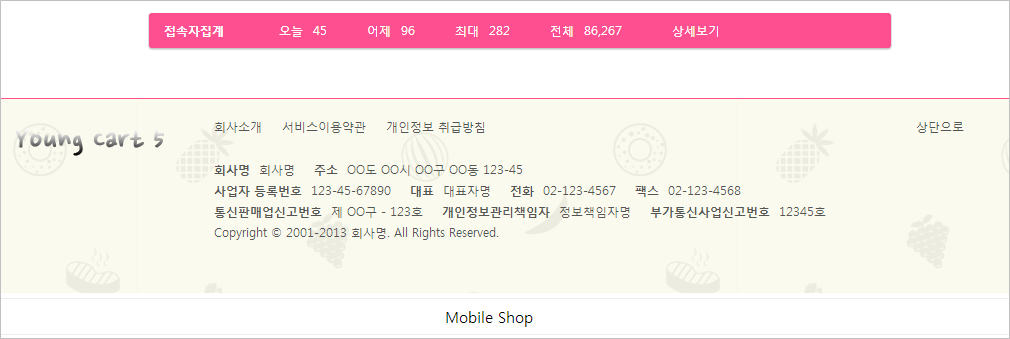
쇼핑몰에도 그누보드와 같은 PC, Mobile 간의 상호 전환 단추를 달아봅니다.
theme/테마명/shop/shop.tail.php
[code]<?php
$sec = get_microtime() - $begin_time;
$file = $_SERVER['SCRIPT_NAME'];
if ($config['cf_analytics']) {
echo $config['cf_analytics'];
}
?>[/code]하단의 위 소스를 아래 소스로 대체
('대체'라기보단 '삽입'이 맞겠지만...)
[code]<?php
if(G5_DEVICE_BUTTON_DISPLAY && !G5_IS_MOBILE) { ?>
<a href="<?php echo get_device_change_url(); ?>" id="device_change">Mobile Shop</a>
<?php
}
$sec = get_microtime() - $begin_time;
$file = $_SERVER['SCRIPT_NAME'];
if ($config['cf_analytics']) {
echo $config['cf_analytics'];
}
?>[/code]
theme/테마명/css/default_shop.css
제일 하단에 아래 소스 삽입
[code]/* Mobile화면으로 */
#device_change {display:block;margin:0.3em;padding:0.5em 0;border:1px solid #eee;border-radius:2em;background:#fff;color:#000;font-size:1.25em;text-decoration:none;text-align:center}[/code]
theme/테마명/mobile/shop/shop.tail.php
[code]<?php
$sec = get_microtime() - $begin_time;
$file = $_SERVER['SCRIPT_NAME'];
if ($config['cf_analytics']) {
echo $config['cf_analytics'];
}
?>[/code]하단의 위 소스를 아래 소스로 대체
[code]<?php
if(G5_DEVICE_BUTTON_DISPLAY && G5_IS_MOBILE) { ?>
<a href="<?php echo get_device_change_url(); ?>" id="device_change">PC Shop</a>
<?php
}
$sec = get_microtime() - $begin_time;
$file = $_SERVER['SCRIPT_NAME'];
if ($config['cf_analytics']) {
echo $config['cf_analytics'];
}
?>[/code]
theme/테마명/css/mobile_shop.css
제일 하단에 아래 소스 삽입
[code]/* PC화면으로 */
#device_change {display:block;margin:5px;padding:5px 0;border:1px solid #eee;border-radius:2em;color:#000;font-size:1em;text-decoration:none;text-align:center}[/code]
잘못된 부분이 있으면 지적 바랍니다.
예 : http://internationale.kr/shop
아래는... 전환 버튼이 기본으로 달리지않은 이유라고 합니다.(편리님 답변)
쇼핑몰 이용자들의 혼돈이 없게 공지가 필요하겠지요.
영카트의 결제 모듈 때문입니다. 모바일과 PC의 모듈이 다르기 때문에 사용자가 임의로 기기를
변경한 후 주문 시 결제를 하면 오류가 발생합니다. 이런 경우 때문에 개발 때부터 기기 변경 버튼은 제외했습니다.
http://sir.co.kr/yc5_tip/221?sfl=mb_id%2C1&stx=fm25
위 내용과 동일합니다.
영카트가 테마 버전으로 변경되었기 때문에 테마의 파일들을 수정했다는 것 말고는 소스의 차이 같은 것은 없습니다.
쇼핑몰에도 그누보드와 같은 PC, Mobile 간의 상호 전환 단추를 달아봅니다.
theme/테마명/shop/shop.tail.php
[code]<?php
$sec = get_microtime() - $begin_time;
$file = $_SERVER['SCRIPT_NAME'];
if ($config['cf_analytics']) {
echo $config['cf_analytics'];
}
?>[/code]하단의 위 소스를 아래 소스로 대체
('대체'라기보단 '삽입'이 맞겠지만...)
[code]<?php
if(G5_DEVICE_BUTTON_DISPLAY && !G5_IS_MOBILE) { ?>
<a href="<?php echo get_device_change_url(); ?>" id="device_change">Mobile Shop</a>
<?php
}
$sec = get_microtime() - $begin_time;
$file = $_SERVER['SCRIPT_NAME'];
if ($config['cf_analytics']) {
echo $config['cf_analytics'];
}
?>[/code]
theme/테마명/css/default_shop.css
제일 하단에 아래 소스 삽입
[code]/* Mobile화면으로 */
#device_change {display:block;margin:0.3em;padding:0.5em 0;border:1px solid #eee;border-radius:2em;background:#fff;color:#000;font-size:1.25em;text-decoration:none;text-align:center}[/code]
theme/테마명/mobile/shop/shop.tail.php
[code]<?php
$sec = get_microtime() - $begin_time;
$file = $_SERVER['SCRIPT_NAME'];
if ($config['cf_analytics']) {
echo $config['cf_analytics'];
}
?>[/code]하단의 위 소스를 아래 소스로 대체
[code]<?php
if(G5_DEVICE_BUTTON_DISPLAY && G5_IS_MOBILE) { ?>
<a href="<?php echo get_device_change_url(); ?>" id="device_change">PC Shop</a>
<?php
}
$sec = get_microtime() - $begin_time;
$file = $_SERVER['SCRIPT_NAME'];
if ($config['cf_analytics']) {
echo $config['cf_analytics'];
}
?>[/code]
theme/테마명/css/mobile_shop.css
제일 하단에 아래 소스 삽입
[code]/* PC화면으로 */
#device_change {display:block;margin:5px;padding:5px 0;border:1px solid #eee;border-radius:2em;color:#000;font-size:1em;text-decoration:none;text-align:center}[/code]
잘못된 부분이 있으면 지적 바랍니다.
예 : http://internationale.kr/shop
아래는... 전환 버튼이 기본으로 달리지않은 이유라고 합니다.(편리님 답변)
쇼핑몰 이용자들의 혼돈이 없게 공지가 필요하겠지요.
영카트의 결제 모듈 때문입니다. 모바일과 PC의 모듈이 다르기 때문에 사용자가 임의로 기기를
변경한 후 주문 시 결제를 하면 오류가 발생합니다. 이런 경우 때문에 개발 때부터 기기 변경 버튼은 제외했습니다.
댓글 2개
10년 전
fm25 님 덕분에 좋은 거 배웠어요. 고맙습니다.
10년 전
유용한 정보 감사합니다!!
게시판 목록
영카트5 팁자료실
| 번호 | 제목 | 글쓴이 | 날짜 | 조회 |
|---|---|---|---|---|
| 371 |
이로홀딩스
|
2년 전 | 1556 | |
| 370 |
페이투페이
|
2년 전 | 1559 | |
| 369 | 2년 전 | 1306 | ||
| 368 | 2년 전 | 1721 | ||
| 367 | 2년 전 | 2063 | ||
| 366 | 2년 전 | 2280 | ||
| 365 | 2년 전 | 2082 | ||
| 364 | 2년 전 | 1611 | ||
| 363 | 3년 전 | 1352 | ||
| 362 | 3년 전 | 3122 | ||
| 361 | 3년 전 | 1924 | ||
| 360 |
 시니어월천 시니어월천 |
3년 전 | 2676 | |
| 359 | 3년 전 | 2431 | ||
| 358 | 3년 전 | 1594 | ||
| 357 |
welcome
|
3년 전 | 1321 | |
| 356 | 3년 전 | 1635 | ||
| 355 | 3년 전 | 1900 | ||
| 354 | 3년 전 | 1566 | ||
| 353 | 3년 전 | 1273 | ||
| 352 | 3년 전 | 1324 | ||
| 351 | 3년 전 | 1432 | ||
| 350 | 3년 전 | 2520 | ||
| 349 | 3년 전 | 1677 | ||
| 348 | 3년 전 | 3277 | ||
| 347 | 4년 전 | 4077 | ||
| 346 | 4년 전 | 2827 | ||
| 345 | 4년 전 | 4496 | ||
| 344 |
별지기천사
|
4년 전 | 3991 | |
| 343 | 4년 전 | 3413 | ||
| 342 | 4년 전 | 2029 |






댓글 작성
댓글을 작성하시려면 로그인이 필요합니다.
로그인하기